Tuesday, March 20, 2012


Religion & Politics in Zomi Myanmar Context
Religion & Politics in Zomi Myanmar Context
(A grass root approach)
Religion & Politics ah
namdang zi/ pasal pen issue hih masa lo leuleu bilbel hi. Mi khat ei a
ding in namdang ihi a, ei zong minam dang khat a ding in namdang mah ihi
hi.
ASSK bang namdang pasal a nei hi. Ahi zong in kawgam hong
ciah ding vai gen loh, a cinat natawm ciang in hong ciah kei zaw in ci
in a pasal in vaikhak kik zaw bilbel hi. ASSK namdang pasal nei, a tate
Kawlpau a sim tumteng loh a, Kaw min natawm akician in a neih loh uh
hang in mipi in ki mung veve in, tampi tak mah in NLD mah ci in compaign
bawl ziahziah lel hi. Tua zong ngaihsut huai khat maw... Politics is
beyond skin & creed).
Politics tatak pen tuate i boundary (daai) a kantan zolo te gualzo ngeilo a, mipi in muantak sa ngeilo zaw hi.
A beisa kum 20 sung SPDC in Kawl ASSK namdang pasal nei cih tawh
Kawlgam sung ah ama i makaihna ngah saknuamlo zahdong in khaktan in,
thongsung natawm ah khum uh hi. Tua ciangciang tolerance nei zokei leh
upna, deihna, party kibanglo mipi bangci makaih zo ding ham cih thu ahi
hi.
Biakna leuleu ah gentehna:
a) Kawlgam ah tapidaw thu hong puak Judson bang a zi missionary a hong pai khiat ding ut hetlo ci mawk hi.
b) William Carey I zi pen india atun khit uh the hak sa sa lua hi mai
ding hi ven, hai mawk hi.Apa sal temta tawh delh thei hi, nu mei dang
tawh um mawh ai tam maw. Kum12 sung hen cip in loih hi.
c) Jhon Wesley pen, Pasian thu hilh in, khual zin na tam pi nei I theih
sa hi. Aciah the akong pan in, azi in, tawt leh lai tawh na dawn ci
hi.
d) SmithWiggle Sworth I zi pen, amau hun lai in, Pasian mi zat mahmah
hi a, Tent meeting(crusade) abawl ziah ziah khat hi. A pasal in, inn
ngak leh ta te cin thuah hi. Ahih theih the, alter call a kiap te thu
nget
sakna ah azi huh hi. A zi pen hun man ta ciang ciah pah thei ngei lo a,
meeting cih mah bang mah nei sawnsawn lai hi lo dia. Apasal lung kim
lo zel thei hi tuak. Khat vei ciang in, heh lua hi ding hi ven, azi
pang in, inn mai pan in apua ah sawn in, kong leh kat hi. Azi zong heh
se lo in, iin nung lam pan in, lut in, nuih cih tak nui ci mawk hi.
Atawp na the apasal zong nui in, ki lem kik ci hi. Zing khawng the amah
pen azi sang khauhpai zaw hi.
A tung a teng etna in leitungmite
kim (perfect) cih bang omlo ahihna hong ki langsask hi. Kim lua zek
lenglah ei leh ei ki phasak in kuamah tawh ki pawl theilo in, tang len
ding hang a, makai picing ki suak ngeilo ding ban ah, mite a phun sansan
ciang lel, mi nawngkai ki suak zaw tham ding hi. Pasian' muhna ah
mihingte a kim cih bang omlo a, tua i kim lohna tek mah in ki
niamkhiatna hong guan in, midangte tawh sep khop theihna, kipawl khop
theihna hong guan zaw hi.
LST sung ah Paul mahmah zong mipil,
milian, a pianthak ma in tapidaw te simmawh ahih hang, Pasian in
Damascus ampi ah a khel khit zawh Pasian' mizat pi ahi hi. Ahi zong in
aman a sung ah ling bang in a sun natna khat nei ci hi. Tua natna in
"kei leh kei kahihna, hong ki remind sak den gige a, ki phatsak ding
hong dal hi..." cih dan khat in LST sung ah na om hi. Mihing pen kisapna
khat ciat kinei a, siamna khat ciat kinei hi. I kisapna leh i siamna
pen khat leh khat aki banglo bek hi a, tua teng i gawmkhop theih ciang
in a picing kalsuanna leh makaihna a neithei ihi zaw hi
Blogger Feed URLs
Blogger Feed URLs
After configuring the settings of your site feed, your blog is now ready to be syndicated to the world! Simply enter one of the following URLs into your favorite feed reader, where your blog's content will be delivered and updated automatically.
Note: Be sure to substitute in the correct blog address for blogname and the label you're interested in for labelname. Site feeds do not work with private or FTP-hosted blogs.
Note: Be sure to substitute in the correct blog address for blogname and the label you're interested in for labelname. Site feeds do not work with private or FTP-hosted blogs.
Full site feed:
- Atom 1.0: http://blogname.blogspot.com/feeds/posts/default
- RSS 2.0: http://blogname.blogspot.com/feeds/posts/default?alt=rss
Note:These full-site feeds are real-time enabled; developers can subscribe to low-latency updates by using the PubSubHubbub protocol.Comments-only feed:
Atom 1.0: http://blogname.blogspot.com/feeds/comments/default
RSS 2.0: http://blogname.blogspot.com/feeds/comments/default?alt=rss
Label-specific site feed:
Atom 1.0: http://www.googleblog.blogspot.com/feeds/posts/default/-/privacy
RSS 2.0: http://www.googleblog.blogspot.com/feeds/posts/default?alt=rss/-/privacy
Individual post comment feed:
- Atom 1.0: http://blogname.blogspot.com/feeds/postId/comments/default
- RSS 2.0: http://blogname.blogspot.com/feeds/postId/comments/default?alt=rss
Note: You can find the postId of an individual post from the Posting | Edit Posts tab. Simply mouseover the 'Edit' link next to a particular post, and that postId will be displayed in your browser's status bar.http://support.google.com/blogger/bin/answer.py?hl=en&answer=97933&ctx=cb&src=cb&cbid=-1x3cjdv8z5289&cbrank=2
Hosting blogspot on your own domain
How do I create a CNAME record for my custom domain?
The Quick Answer
- If you bought your domain name from Blogger, you won't need to create a CNAME record.
- If your domain is registered with another company, you'll need to follow company-specific instructions.
CNAME
A CNAME, or Canonical Name, record is an entry within the Domain Name System (DNS) that specifies where a user can find your web pages, or any other URL. You'll use the CNAME to associate your custom domain with your blog.After registering your domain, decide if you want to use a particular subdomain for your blog. E.g. instead of
www.mydomain.com you could use something like blog.mydomain.com, if you want. Then you'll create a corresponding CNAME record for that address, associating it with ghs.google.com. Keep in mind that changes to DNS records make take up to 48 hours to take effect.Each hosting service has slightly different ways to create CNAME records. Guidelines are provided here for some of the common services. When in doubt, check with the particular company you're using for additional help or instructions.
- GoDaddy.com
- ix web hosting
- 1and1
- EveryDNS.net
- Yahoo!SmallBusiness
- No-IP
- DNS Park
- Other hosting services
GoDaddy.com
- Log in to your account at www.godaddy.com.
- Open the Domains tab and select My Domain Names. You'll be directed to the Domain Manager page.
- Click the domain that you'd like to use with your blog.
- Click the Total DNS Control And MX Records link at the bottom of the section entitled Total DNS.
- Click Add New CNAME Record in the box labelled CNAMES (aliases). If you've already created a CNAME record for your blog's address, click the pencil icon next to the existing CNAME record.
- For the Name, enter only the subdomain of the address you want to use for your blog. For example, if you picked
www.mydomain.comas your address, enterwwwhere. - Enter
ghs.google.comas the Host Name. Specify a TTL or use the default setting of 1 hour. - Click OK, and then click OK again.
ix web hosting
- Log in to your account at ix web hosting.
- Click Manage below the Hosting Account section.
- On the left side, click the domain you'd like to use with your blog.
- Next to DNS Configuration, click EDIT.
- Click Add DNS CNAME Record.
- Under Name, enter only the subdomain you want to use. For example, if you picked
www.mydomain.comas your blog's address, just enterwwwas the entry under Name. - Enter
ghs.google.comunder Data. - Click Submit.
1and1
- Log in to your account at https://admin.1and1.com
- If it's not already selected, click the Administration tab.
- Click Domains. The Domain Overview page appears.
- From the New drop-down menu, select Create Subdomain. (If you've already created a subdomain for your blog's address, skip to step six.)
- Enter only the subdomain you want to use, and click OK. For example, if you chose
www.mydomain.comfor your blog's address, you should enterwwwhere. - Select the checkbox next to the subdomain that you will be using. (Example:
www.mydomain.com) - From the DNS menu, select Edit DNS Settings.
- Click the radio button next to CNAME.
- Enter
ghs.google.comnext to Alias. - Click OK.
EveryDNS.net
- Log in to your account at EveryDNS.net.
- On the left side, click the domain you'd like to use with your blog.
- Since EveryDNS.net is your hosting service, and not your domain registrar, be sure that your domain points to EveryDNS.net's nameservers. This will allow your CNAME record configuration to take effect.
- Below Add a Record:, you can create your CNAME record.
- Next to Fully Qualified Domain Name, enter only the subdomain you want to use. For example, if you picked
www.mydomain.comas your blog's address, just enterwwwas the entry next toFully Qualified Domain Name. - Select CNAME as the Record Type.
- Enter
ghs.google.comas the Record Value. - Click Add Record.
Yahoo!SmallBusiness
- Log in to your account at smallbusiness.yahoo.com.
- Click Domain Control Panel below the domain you'd like to use with your blog.
- Click Manage Advanced DNS Settings.
- Click Add Record.
- In the Source field, enter only the subdomain you want to use. For example, if you designated
www.mydomain.comas the address of your blog, enterwwwin the Source field. - Enter
ghs.google.comin the Destination field. - Click Submit.
No-IP
- Log in to your account at No-IP.
- On the left side, click Host/Redirects.
- Click Manage underneath Host/Redirects.
- Click Add for a new entry, or click Modify and skip to step six for an existing entry.
- Enter the host name (example:
wwwfromwww.mydomain.com), and select your domain name. - Select DNS alias CNAME at the host type.
- Enter
ghs.google.comas the Target Host and click Modify.
DNS Park
- Log in to your account at DNS Park.
- On the left side, click DNS Hosting.
- Click the domain you'd like to use with your blog.
- Since DNS Park is your hosting service, and not your domain registrar, be sure that your domain points to DNS Park's nameservers. This will allow your MX record configuration to take effect.
- Click Alias Records.
- Under Host Name, enter only the subdomain you want to use. If you picked
www.mydomain.comas your blog's address, enterwww. - Under Destination Name, enter
ghs.google.com. - Click Add Alias.
Other hosting services
- Log in to your account on your hosting service's website, and go to the DNS management page.
Since CNAME records are special Domain Name Service (DNS) records, they may be in sections such as DNS Management or Name Server Management. It's possible that you will have to enable advanced settings to create a CNAME record. - Delete existing CNAME entries for the address you want to use with your blog.
Before entering a new CNAME record to point to Google, you should first delete any existing entries for the same alias. If you plan to transfer an existing web address to Blogger, you may want to copy any content currently at that address elsewhere first. - Use the information in the following table when you create your CNAME record.
If your service requires you to enter server information directly into the DNS tables, the entry below needs to have a type CNAME associated with them.
Host Name/Alias Value/Destination www ghs.google.com * This is the part of your website's address that you designated. For instance, if you chose www.mydomain.comas the address,wwwis the host name.
http://support.google.com/blogger/bin/answer.py?hl=en&answer=58317
How do I use a custom domain name for my blog?
Blogger offers two free publishing options for your blog: hosting on Blogspot (example.blogspot.com) and hosting on your own custom domain (www.example.com or foo.example.com). You can change your publishing option at anytime, and your content will always remain unaltered regardless of which of these options you choose.
Whether you want to purchase a new domain through Blogger or publish on a domain which you already own, we’ll walk you through the process of setting up your blog for a custom domain.
What would you like to do?
Is your URL hosted by GoDaddy.com?
Where would you like to host your blog?
- Find the control panel on your domain registrar’s website, and locate your DNS (Domain Name System) settings. In order to link your blog to your custom domain, follow the instructions below to enter your "CNAME" and "A-records."
CNAME
Where it says Name, simply enter "www" and list ghs.google.com as the Host Name. See our detailed instructions on providing CNAMEs for various registrars. If yours isn't listed, or if you run into other difficulties, contact your registrar directly and they can help you out.
A-records (optional)
The following action links your naked domain (example.com) to your actual site (www.example.com). If you skip this step, visitors who leave off the "www" will see an error page.
Enter your domain name in the format example.com, and list the I.P. addresses shown below in the "A" section. You'll need to create four separate A-records which point to four different Google IPs.
216.239.32.21
216.239.34.21
216.239.36.21
216.239.38.21 - Update your Blogger settings
Before you move onto this step, wait about an hour for your DNS settings to activate. If you attempt to change the publishing settings before the DNS changes activate, then we'll let you know with a warning message.
Now it’s time to make sure Blogger knows about your custom domain so that Google can direct readers to your blog. Just head back to Blogger and update the information on your Settings | Basic tab. Find the area for "Publishing," and click the link to add a custom domain.

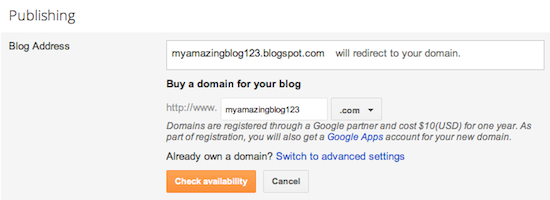
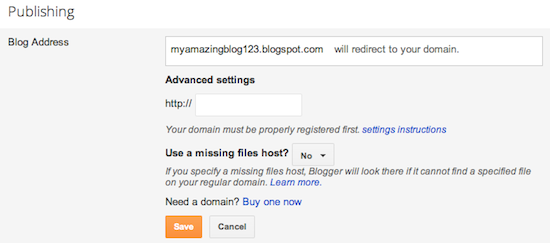
- If your new domain isn't taking you to your blog, wait another day or two to make sure all the DNS servers have been updated. If it still isn't working, contact your registrar to make sure you entered the DNS settings correctly.
- Your original Blogspot address will automatically forward to your new domain. That way, any existing links or bookmarks to your site will still work.
- Your posted images will continue to display on your blog.
The Zomi origin
Q1. Are we Zomi because we were the dwellers of Zo/Zou or thick forest?
A1. The Kachin, Karen and Shan peole have thicker forest in their land. They have a higher mountain than those of the Zogam (Khonumthung) or Mount Kennedy. Khaa borazi mount of Kachin State is the highest mountain in Myanmar but we never call the dwellers as Zo or Zomi but just because they live on/ in and near the mountains. The inhabitants are known as Kachin or Jingphaw.
The Karens have a deeper and thicker forest than the Zomis but we never called them nor they never identified themselves as Zo or Zomi just because they live in the jungle, forest or on the mountain. If all the highlanders are Zos or Zomis then not only the Kachins, Karens but all the other 5 states of Burma will be called Zo or Zomi.
If the highlanders or mountain dwellers are called Zo because of the place they live, we won't have Kachin, Karen, Kaya, Mon, Rakhine and Shan states & people in Burma.
Q2. Is Zomi the descendants of our progenitor Pu Zo?
A2. We called ourselves Zomi since time immemorial. We were "Zomi" even before we have written language. There were no other name that we know or call ourselves until the British colonization can replaced but Zomi. Therefore, Zomi is our original name.
However, there are some theories on how we get the name. The most ancient historical record we can trace our genealogy is up to Pu Zo as a person. There is no single evidence to disapprove his in-existence. The reason we call ourselves Zomi has more or less link to the progenitor of Zo being a person. If there is no existence and link of Pu Zo as a person then we won't have names such as Zo vok, Zo an, Zo puan, Zo ngeina etc. We could have call vok (pig) as Gam Vok or Mountain Pig or Forest Pig or we call (Ngal) for the one who live in the jungle but Zo vok for the one we breed. So, it is undeniable that the existence of Pu Zo has more or less relation to our people as Zo or Zomi.
The proper writing system of our identity between Zo and Zomi is not an issue since it is an interchangeable as in Zo people, Zomi or Zomi people depending on its context. However, the vast majority of our people would accept and use as Zomi in reference to our people as it is more relevant to the preference the majority.
Apart from Zomi or Zo mi, no other name existed until the British colonization and Burmanization. Therefore, the historical truthfulness and originality of our true identity can never be anything else but Zomi.
Monday, March 19, 2012
ICANN Newsletter - 16 March 2012

ICANN Weekly Newsletter
News from the Internet Corporation for Assigned Names and Numbers
http://www.icann.org/ Week ending 16 March 2012
Announcements This Week
Board–GAC Working Group Announces Implementation of ATRT Recommendations on GAC Advice and GAC Advice Register
At the ICANN 43 Meeting in San Jose, Costa Rica, the Board-GAC Recommendation Implementation Working Group (BGRI-WG) met to review efforts to implement the Accountability and Transparency Review Team's (ATRT) GAC-related recommendations.
16 March 2012
Notice of Extension of ICANN Comment Period: IDN Variant Issues Project – Proposed Project Plan
In response to comments made by participants at the ICANN public meeting in Costa Rica, ICANN has extended this public comment period for 21 days until 8 April 2012.
16 March 2012
Review of the ASO
ITEMS International, a consultancy engaged by the NRO to undertake an independent review of the ASO, has delivered its final report.
16 March 2012
Security, Stability & Resiliency of the DNS Review Team (SSR RT) - Draft Report
The SSR Review Team is publishing its Draft Report and Recommendations for public comment to inform the Review Team's work in producing a Final Report.
15 March 2012
Global Policy Proposal Recovered IPv4 Address Space
A Global Policy Proposal has been received for ratification by the ICANN Board. Comments are invited to inform the ICANN Board prior to the its decision.
14 March 2012
ICANN Signs Accountability Framework with ccTLD Manager for Curacao (.CW)
ICANN announced today that it signed an Accountability Framework with the country code Top Level Domain (ccTLD) manager for .CW (Curacao), Universiteit van de Nederlandse Antillen (UNA), on 12 March 2012.
13 March 2012
Costa Rica President Laura Chinchilla Says The Internet is a Source of Hope, Not a Threat [PDF, 286 KB]
San José, Costa Rica… Addressing the ICANN Public Meeting in San Jose, Costa Rica's 49th President, Laura Chinchilla said, "The Internet is the hope of an integrated world without frontiers, a common world without controlling owners, a world of opportunities and equality. This is a utopia that we have been dreaming about and is a world in which each and every one of us are protagonists of a destiny that we have in our hands."
12 March 2012
ICANN Board Conflicts of Interest Review - Revised Conflicts of Interest Policy and Related Governance Documents
ICANN is opening this public comment forum to receive comment on revisions to the Board Conflicts of Interest Policy, Code of Conduct and Expected Standards of Behavior as well as a proposed Corporate Governance Guidelines prepared as part of ICANN's ongoing review of its Conflicts of Interest and Ethics practices.
11 March 2012
ICANN Seeks Expressions of Interest for Review of Accountability Mechanisms
The Internet Corporation for Assigned Names and Numbers (ICANN) is seeking expressions of interest to serve on a committee of independent experts to review ICANN's Accountability Mechanisms.
11 March 2012
Costa Rica President Laura Chinchilla to Address ICANN Public Meeting
Costa Rica's 49th President, Laura Chinchilla, will address the opening session of ICANN's public meeting when it convenes in San Jose on Monday, 12 March.
10 March 2012
Upcoming Events

About ICANN
Our bylaws are very important to us. They capture our mission of security, stability and accessibility, and compel the organization to be open and transparent. Learn more at www.ICANN.org.
Numei Innluah za leh Pawlpi Upa
Numei innluah za leh pawlpi upa sep vai kikupna
Pawlpi sung ah Numeite Upa
sem sak cih leh Numeite innluah vai pen thu kibanglo (role) kibanglo
vaipi nih ahih manin "Yes or No" cih sang in kikup a kul leh, a thu dan
khat tawm khat mah suut kul leh kilawm kasa hi.
1. Innluah za cih pen sep a kullo, bawl a kullo a ngah thu hi (a kipiak nak leh)
-Hih pen ngeina, innkuan beh leh phung zat zia tung ah kingah ding hi.
-Tua ban ah innkuan, unau sung ah pasal a om kei leh numei in inn a
luah ding pen kuamah kim in sang thei, sang siam in ka lamen hi.
-Pasal unau pih om in, numei innluah za pia cih bang ahih leh a thutuam
hi ding a, numei pen a u pen maw ahih kei leh a pasal pen i dinmun cih
bang "case to case" tung ah zong kingah in lamen ingh. I ngeina ahih leh
bel Pasal te innluah hi a, u pen te in innluah hi. Ahi zong in tuhun ah
i ngeina dan in ki kalsuan khin theilo leh, thu leh la tuamtuam hang
tawh zat dan, zat zia pen a hunzui in i kalsuan ding akisapna zong om
thei hi.
2. Decon/ Pawlpi upa cih pen sep a kul hi a, ngaihsut a kul hi in, thatang mah zong gim kul, tawl kul thei hi.
-Decon icih pen "usher" or "Welcome team" or "palai dan" a sem dingte,
service a piading te ahi uh hi. Tua ahih amn in numei ahi a, pasal ahi
a, gay or lesbian ahi zong in biakna sung ah khantohna ding a kalsuan
pih theih nak leh, a sep zawh nak leh, a ki piakkhiat zawh ding nak leh
khen ding kilawm kasa kei hi. Tuhun diakdiak ciang in human rights om a,
numei leh pasal i sep leh bawl ki deidanna pen tawm tektek ta hi.
Deacon ah zong numei te kilawmlo cih a mu zong om hi. Tua pen pawlpi
thukhun, upna kalsuan zia (dogma, doctrine and teachig of the church)
tung ah zong kingah hi.
Bang zahta in i biakna ngeina in i zang
zong in Lai Siangtho tawh akituak takpi mah hiam, LST in a gen takpi
mah hiam cih et kik ding akisap hun zong om thei hi. I zat ngei zeel
ahih man in deacon ding in pasal mah kilawm zaw kisa hi. Senior Pastor
ding in zong i muh ngei zeel ahih man in pasal ding mah in kilawm kisa
pong hi. Ahi zong in LST in numeite in pastor sem theilo ding, deacon
sem theilo ding cih khamna leh dalna om lo in thei ingh.
Zomi sung ah Biakna leh Politics
Zomi sung ah Biakna leh Politics
Pastor te leh Pasian' nasemte in Zomi it in, vei ciat uh hi. Zomi lo te zong itna nei veve uh hi. Zomi pastor te in politics hong uk luat ding a lungngaih huai hi zaw tham hi. Bang hang hiam cih leh Pastor te in mipi' huzaapna pen politician te sang in lian zaw tham hi.
Pastors & preachers have more influence on people than politicians. Therefore, pastors should not go too much in politics or else, our politicians will loose their credentials...
Pastor te in politics hong uk lua le uh gam nasemte in a mun uh taan lawh zo thei ding ahih man in gam vai hong ki nak hel lua ding hoih khinlo thei hi.
Pastor te pen lai sim, lai sin thu theite uh hi. Thugen zong sim in, mipi' lungsim zong zo zaw uh hi. Kum tampi mah lai sin uh a, Biakna vai, history vai, LST sung politics leh biakna vai etc. kum tampi a sinte uh hi.
Zomi politics a uk icih teng, tu ciangciang kum tampi a sin ki omlo a, uk ciang leh sep bek mah hi. Experience ciang bek mah hi. Politics vai lai a sin tangtang a om loh ban ah, LST lam or Pasian' thulam zong a sin tu ciangciang i theihna ah akihel om nailo hi.
Pastor te in politics, ethnics, sociology, philosophy, theology, region etc. a sin ban ah, mipi tawh kizopna, mipi lak thugenna leh mipi lungsim zawhna kum tampi experience in nei uh hi.
Zomi politics a uk te, a semte in Pasian thu ahi a, Politics hi ta leh lai tawh sin tangtang cih bang ki omo zaw hi (Kawlgam lam a te pha diak). Tua ahih man in amuhna uh to zaw tham a, internet experience a neih loh zawk ban ah, party lungsim, singlness nei den in huam zolo thei a, lunsim ngaihsutna tangzai lo thei hi.
Tua ahih man in politics i khantoh ding i deih leh Pastor te in politician te a panpih, a thuhilh, a gen pih, a backup ding kisam hi. Tua ahih kei leh Zomi politics pen tu laitak dinmun tawh ki gualzo pako thei kha ding hi.
Gam vai icih ciang in Kiukna (government) ahi hi. Kiukna vai pen leitungbup democracy hong tam kizatna icih ahi US te natawm zong Lai Siangtho mah a bulphuh hi uh a, Obama hong kah ciang in tuate hong nilkhiat sawm ciang in amah akai deih nawnlo, tampi mah in, a diakdiak Tapidaw (Christian) te in a lungkimlo uh ahi hi. Abortion, gay marriage, lesbian etc. tuamtuam thapia cih pen nidang a Bush i ki teel pih ahi El Gore? dan ahi hi.
Democratic principal leh Dimocratic governmance hong kipatna tatak pen Eden huang sung ah Pasian' in Adam leh Eve tung ah "sia leh pha teel theih na" (FREE WILL OR FREEDOM OF CHOICE)" pan hong kipan masa hi cih keima mimal sandan hi.
Tua hi in Pasian' a bulphuh lo zah dong in a pilllua Zomi lak ah ki om nailo a (tu ciangciang), tu laitak gamdang mun tuamtuam ah kitung in, nasep silbawl, pilna leh siamna i neih sunsun teng zong a bulpi ngaihsun leng Pasian' hang bek mah cih i manhilh loh ding kisam hi. Ei leh ei kimuang baih lua in, ki hisak baih lua ka leng, bangmah ihih loh lam i ki theih ciang, mite in bang mah ihih loh lam hong theih uh cianghogn maizum huai zaw ding hi.
Thu ngaihsun thei pawl khat in POLITICS IS A DIRTY GAME naci lela sam uh hi. Dirty cih zong bel thu khat ven ah, GAME acih bel thukim pih ingh. Game bang ci kimawl, puzzle bang ci khin cihte pen a mimal mahmah a muanhuai ding thupi hi. Pasian' a zahtak te in mipi a makaih leh a a theih loh man bek hi ding a, khem bawl ngeilo ding hi. Pasian' maitang etna tawh. Ahi zong in politicians te in ahih leuleu leh mipi Pasian' bulphuh masa lo in, mipi' lungkim ding hanciam a, mipi' deihna nam nih or nam nih sang a tamzaw in hong kikhken ciang in buai thei uh a, a cih nading uh om lo thei hi.
Tua ban ah politics icih pen GAME ahih lam pen i sang siam a, i sang siam kei zong in ama hihna khat ahi hi. Tampi genlo in etkakna khat nung kum lam a i tuah sung pan en pak leng ah:
November 2010 ma, Kawlgam sung kum 20 sung Election khat vei akibawlna sung ah election ding pen Sunday bawl ding cih thu hong ging hi. Sunday ahih leh Pasian' biakinn pan pialkhia liang in, kikhawm lo liang in, Pasian' thei nawnlo maw etc. tawh a gen tampi tak om hi. Tua a gen teng pen biakinn khat vei zong akikhawm ngeilo teng hi sawnsawn citciat hi.
Tua leh Noverber 13(?), 2010 in Aung San Su Kyi thong sung pan hong ki khahkhia a, tua pen Saturday nitak lam ahi hi. Khua zan ta ahih teh press release leh Sunday in NLD zumpi, Shwe Gone Dine ah bawlding acih ciang in a zing ciang a maigual lam ah nipini kikhawm lo liang in a tutna kituh lak ah, nung a Sunday kikhawmlo liang a election lut ding maw... acici teng na om masa pen uh hi. Cih nopna ah tua teng pen politics aki uk sak teng, uk akisa teng, a vei akisa teng ahi uh hi. Tu lai kampau leh "zuau thu leh khemna vive tawh akilawmsakna bek a politics vei akineih uh nahi gige hi..."
Kawlgam sung politics vai ah politic deih tak in a sin ngekngek, displined learning a nei tu ciang ki omlo ci leng ki nak khialh lua lo ding hi. Experience vive bek mah hi lai phot hi. Ahi zong ni biakna makaite, biakna siate ahih leh ki makaihzia, kiukzia, kiukna vaite ah kum tampi sung discipline tawh Bachelor, Master, Doctrate cih bang sin ngekngek in, lai sim ngekngek in experiece leh lai simna tawh kop khawm ahih man in i biana makaite in mipi' lungsim zo zaw in, knowledge nei zaw pah uh a, a sep a bawlna uh mipi in ki thapia zaw pah uh hi.
A beisa hun sung ah veina bek tawh na kisem thei hi mah ta leh, tuhun leh mailam hun ah veina pong tawh khua kisuak zo nawnlo ding a, sinna leh veina a kigawm kul a, theihna leh sepna i kop khop a kul ahi hi.
Ending means a greater begining: Posterous website acquired by Twitter

Big news: Posterous has been acquired by Twitter!
The opportunities in front of Twitter are exciting, and we couldn’t be happier about bringing our team’s expertise to a product that reaches hundreds of millions of users around the globe. Plus, the people at Twitter are genuinely nice folks who share our vision for making sharing simpler.
Posterous Spaces will remain up and running without disruption. We’ll give users ample notice if we make any changes to the service. For users who would like to back up their content or move to another service, we’ll share clear instructions for doing so in the coming weeks.
You can find more information answers to other questions you may have here.
Finally, we’d like to offer thanks to all of our users, especially those who have been with Posterous since day one. The last four years have been an amazing journey. Your encouragement, praise and criticism have made us better. Thanks for that. We look forward to building great things for you over at Twitter.

What happens to my Space? Will Posterous eventually shut down?
You can use your Space(s) exactly as you have in the past. We’ll give you ample notice before any changes or disruptions to the service and we’ll provide specific instructions for exporting your content to another service.
Can I still post to my Space?
Yes, you can continue to post via email the Web or our iPhone or Android apps. We’ll give you ample notice before any changes or disruptions to the service.
How can I backup or export the content of my Space(s)?
We’ll share instructions on how you can backup the content of your Space soon.
What happens to my content if I don’t do anything to my Posterous account?
We’ll give you ample notice before any changes to the service and we’ll share clear instructions about how to move your content to other services. In the meantime, your Spaces will remain up and running without disruption.
I bought a custom domain from Posterous – what happens to it?
Our domain partner, eNom, will take over domain management. Over the next several days, you will receive an email with instructions for accessing your new domain account.
I am redirecting my domain/subdomain to Posterous – what do I need to do?
Your domain or subdomain will continue to point to your Posterous Space. You do not need to change anything.
Can I export my Space’s to Wordpress, Tumblr, Blogger, or another service?
Over the coming weeks we’ll provide you with specific instructions for exporting your content to other services.
Subscribe to:
Posts (Atom)